Everything you need to manage multiple Claude Code accounts.
ccpm is a single static binary that creates fully isolated Claude Code profiles — each with its own credentials, settings, memory, and MCP servers.
Installation
Pick a package manager. ccpm ships as a single static binary, so any of these paths gets you to the same place.
npm i -g @ngcodes/ccpmgo install github.com/nitin-1926/claude-code-profile-manager/ccpm@latestcurl -fsSL https://raw.githubusercontent.com/nitin-1926/claude-code-profile-manager/main/scripts/install.sh | shgit clone https://github.com/nitin-1926/claude-code-profile-manager.git
cd claude-code-profile-manager/ccpm
go build -o ccpm .
./ccpm --versioncurl -fsSL https://raw.githubusercontent.com/nitin-1926/claude-code-profile-manager/main/scripts/install-desktop.sh | shNative macOS app. Picks your chip, verifies the checksum, installs to Applications and updates itself. Uses the ccpm CLI for changes.
Desktop app
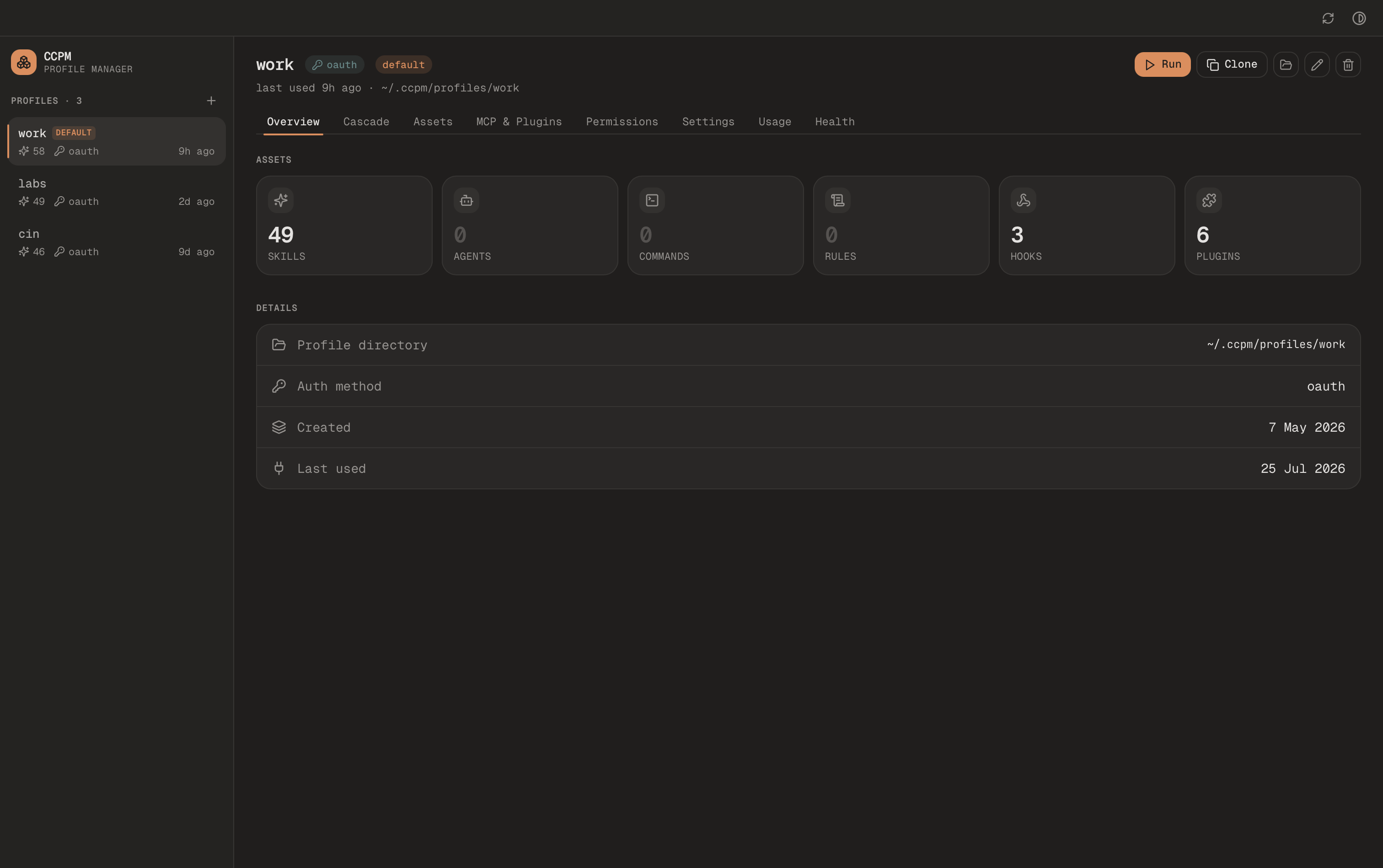
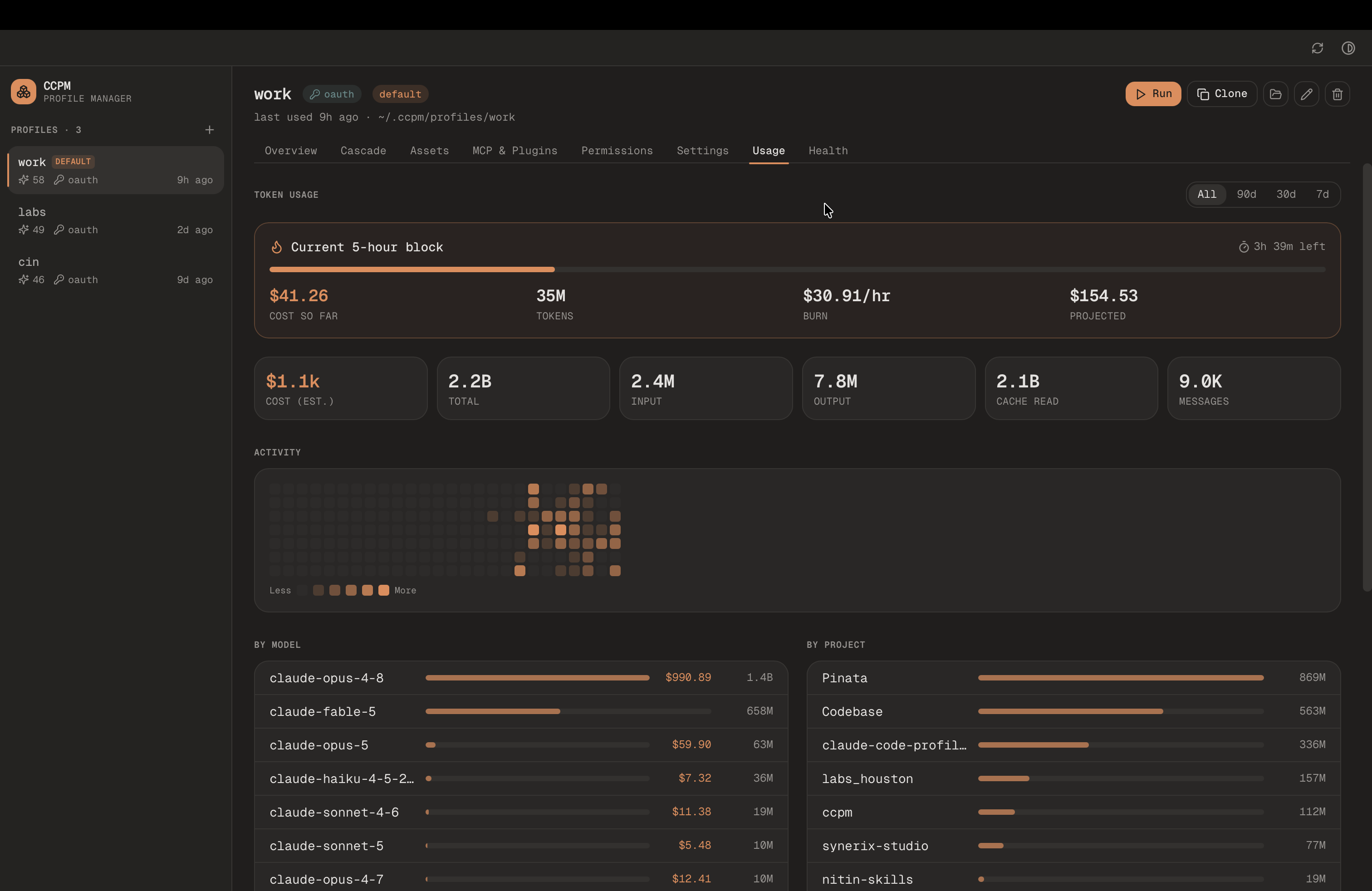
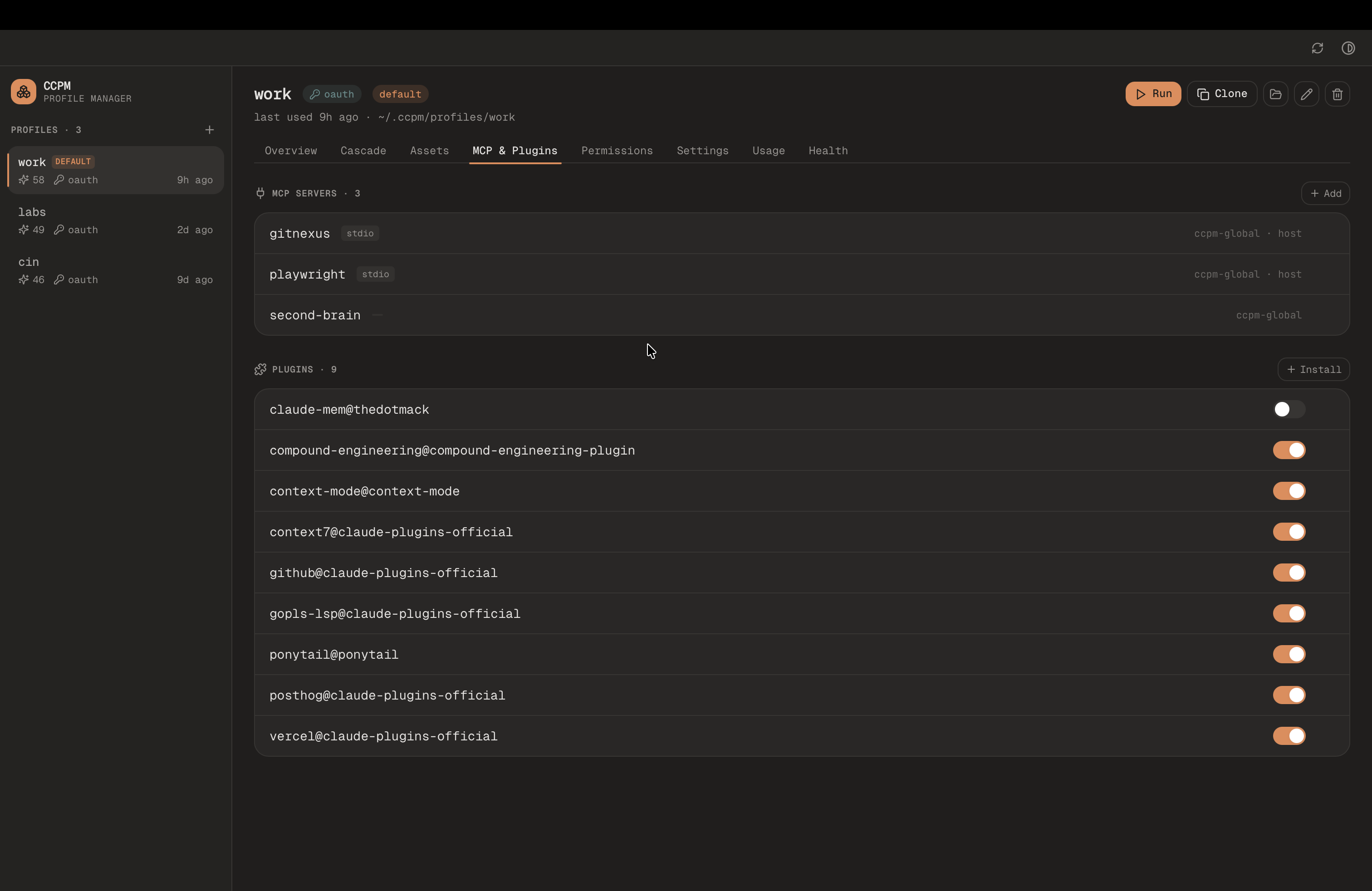
CCPM Desktop is a native macOS GUI over the CLI — built with Wails (Go + native webview) in the same module as ccpm, so it reuses ccpm's own engine for reads and shells out to the ccpm CLI for writes (same locking, keychain, and validation). A left sidebar of profiles, and per profile: Overview, Cascade (the effective host→global→profile config with provenance badges), Assets, MCP & Plugins, Permissions, Settings (settings JSON, the status line layout, and the usage notch), Usage, History(browse, read and search this profile's past Claude Code sessions), and Health (ccpm doctor). Clone, rename, delete, open, and run from the toolbar; the view auto-refreshes when the CLI changes things underneath it. Three built-in themes (Graphite, Midnight, Light) toggle from the title bar.
Usage notch
An optional notch that grows out of a screen edge, with one ring per profile: the big ring is your 5-hour window (or your weekly one, if you pick it as the main ring), the thin inner ring the other, coloured by how much headroom is left, on the same thresholds ccpm statusline uses, so the notch and your terminal never disagree. On the top edge of a Mac with a camera notch it joins the camera notch. Hover a ring for the detail: which account and plan it belongs to, how old the reading is, and per window a reset time, a bar, and the percentage used.
Configure it in the Usage notch section of the Settings tab: a switch to show or hide it, and while it is on, whether it opens on hover or stays open, which edge it sits on (Top, Left, Right or Bottom), which window is the main ring, whether to show the percentage under each ring (hiding it gives the rings more room, handy on the top edge with several profiles), and a switch per profile. Turning it off and back on keeps your choices. In hover mode it folds to a slim pill at the screen edge and opens when you reach for it (Reduce Motion turns the animation into a jump).
Where the numbers come from. Claude Code already sends your rate-limit windows to ccpm statusline, and ccpm caches them per profile — no API call, and no credentials read. The trade-off is that a profile’s reading only refreshes when you actually use Claude Code on it, so the callout always tells you how old the number is and says so plainly once it goes stale. A profile you have never run shows an empty ring and “No reading yet” rather than a misleading 0%, and so does a profile with its own custom statusLine, because only ccpm's status line records the readings. Only subscription plans (Max/Pro) report limits at all; API-key profiles say so instead of pretending.
Install (macOS)
One line in Terminal. It picks the build for your chip, verifies its checksum and puts CCPM in Applications, ready to open:
curl -fsSL https://raw.githubusercontent.com/nitin-1926/claude-code-profile-manager/main/scripts/install-desktop.sh | shNative macOS app. Picks your chip, verifies the checksum, installs to Applications and updates itself. Uses the ccpm CLI for changes.
ccpm CLI for all write actions — install it firstif you haven't. Reads work through the shared engine; writes shell out to the CLI.Updates are automatic. When a new build ships, the app shows an in-app Update nowprompt, downloads it, verifies the SHA-256, and swaps itself in place, with nothing to re-download. If it can't replace itself (its folder isn't writable by you, or macOS is running it from a temporary location because it was never moved to Applications), it tells you instead of quitting. The desktop app versions independently of the CLI (on desktop-v* tags; current: desktop-v0.2.1).
Build from source
go install github.com/wailsapp/wails/v2/cmd/wails@latest   # one-time: the Wails CLI

cd ccpm
make desktop         # builds desktop/build/bin/CCPM.app
make desktop-dev     # hot-reload dev window
Quick start
Three commands and you have two completely separate Claude Code sessions running side by side.
# create your first profile
ccpm add personal

# create a work profile
ccpm add work

# run them in parallel
ccpm run personal   # terminal 1
ccpm run work       # terminal 2
Profile management
ccpm add <name>
Create a new profile. If ~/.claude exists or you already have at least one ccpm profile, an import wizard runs first so the new profile can start from your default Claude config or be cloned from an existing profile. Then you choose between OAuth (browser login) or API key authentication.
$ ccpm add personal
How do you want to seed this profile?
  1) Start empty
  2) Import from ~/.claude (skills, commands, hooks, agents, settings)
  3) Clone from another profile
Enter choice [1/2/3]: 2

Choose authentication method:
  1) OAuth (browser login via claude /login)
  2) API key (enter your Anthropic API key)
Enter choice [1/2]: 1

✓ profile "personal" authenticated via OAuth
ccpm list
List all profiles with their authentication status. Also available as ccpm ls. Pass --json for machine-readable output with stable snake_case fields (name, auth_method, valid, status, default, last_used, expire_at, dir) you can pipe into jq or another tool.
# human-readable table
ccpm list

# machine-readable JSON
ccpm list --json

# e.g. the default profile's name
ccpm list --json | jq -r '.[] | select(.default) | .name'
ccpm clone <source> <new>
Duplicate a profile: its skills, agents, commands, rules, hooks, MCP servers, plugins, and settings are copied, and (unless --no-auth) its credentials are copied too. Handy for a throwaway/scratch copy of a profile you don't want to disturb.
# duplicate "work" into "work-scratch" (assets + settings + auth)
ccpm clone work work-scratch

# copy assets/settings only; leave the clone unauthenticated
ccpm clone work work-scratch --no-auth
ccpm auth refresh work-scratch--no-auth and run ccpm auth refresh <new> to give it its own login. API-key clones have no such caveat.ccpm remove <name>
Delete a profile including its directory, keychain entries, and vault backup. Use --force (-f) to skip confirmation. Also available as ccpm rm.
# with confirmation prompt
ccpm remove work

# skip the prompt
ccpm rm work --force
ccpm status
Show system overview: ccpm version, Claude binary location, all profiles and their auth health.
ccpm rename <old> <new>
Rename a profile. Keychain entries and plugin paths move with it. Already-running Claude Code sessions are not affected; restart them to pick up the change.
ccpm diff <a> <b>
Show what differs between two profiles: managed assets (skills, agents, commands, rules, hooks), settings-fragment keys, env var names (values are never printed), MCP servers, and installed plugins. Useful when one profile behaves differently from another.
ccpm diff personal workRunning Claude
ccpm run <name>
Recommended. Launch Claude Code with the given profile. Sets CLAUDE_CONFIG_DIR and ANTHROPIC_API_KEY (for API key profiles), then replaces the process with Claude. Works without any shell setup.
Unknown flags after the profile name flow through to claude directly, with no -- separator needed for the common cases. Five flags are intercepted by ccpm: --ccpm-env KEY=VALUE (repeatable, one-shot env override), --no-auto-adopt (skip the host-asset cascade scan for this launch), --no-statusline (skip injecting the default status line for this launch), --help, and --version. Use -- to forward --help or --version to claude.
# flags forward to claude without a separator
ccpm run work --dangerously-skip-permissions
ccpm run work --model claude-sonnet-4-6

# one-shot env override (persists nothing)
ccpm run work --ccpm-env ANTHROPIC_BASE_URL=https://proxy.example

# forward --help or --version to claude with the -- separator
ccpm run work -- --help
ccpm run work -- --version
ccpm use [name]
Set the active profile for your entire shell session. Requires the shell hook. After running this, any claude command in that terminal uses the selected profile.
Called without a name in an interactive terminal, ccpm use opens a profile picker. In non-TTY contexts (scripts, CI) the name argument is required.
Authentication
ccpm auth status [name]
Check credential validity across profiles. Shows email for OAuth profiles, masked key for API key profiles, and vault backup status. Pass a profile name to inspect just that one; omit it to see every profile. Entries flagged as ⚠ expire within seven days.
ccpm auth refresh <name>
Re-authenticate a profile. For OAuth: launches Claude for /login. For API key: prompts for a new key (hidden input in a TTY, or reads from stdin when piped).
ccpm auth backup / restore
Save an encrypted credential backup to ~/.ccpm/vault/ (AES-256-GCM, master key in the OS keychain) or restore one after a machine migration. See Vault backup for the full story.
Import & wizard
ccpm has three ways to bring existing Claude assets into a profile: the interactive wizard that runs during ccpm add, ccpm import default for pulling from ~/.claude, and ccpm import from-profile for cloning between ccpm profiles.
ccpm import default
Import skills, commands, hooks, agents, rules, settings, MCP servers, and plugins from ~/.claude into one or all profiles. Dedupable targets (skills, agents, commands, hooks, rules) are routed through the shared store at ~/.ccpm/share/ and symlinked into the profile so the same asset is not copied twice.
# import everything into one profile
ccpm import default --profile work

# import only skills into every profile
ccpm import default --all --only skills

# preview what would happen without writing
ccpm import default --profile work --dry-run

# overwrite existing profile files
ccpm import default --profile work --force

# copy directly instead of symlinking (opts out of dedup)
ccpm import default --profile work --no-share

# keep symlink-to-dir entries as live symlinks into the share store
ccpm import default --profile work --live-symlinks

# skip every per-item prompt and import all discovered assets
ccpm import default --profile work --select-all

# decide whether imported MCP servers live in the global or per-profile fragment
ccpm import default --profile work --mcp-scope profile
Valid --only values: skills, commands, rules, hooks, agents, settings, mcp, plugins. Pass them comma-separated.
Interactive wizard. In a TTY, ccpm import default opens a guided flow: pick the target profile (or all), choose which asset types to import, select individual items within each type, decide whether symlink-to- directory sources stay live or are snapshotted, and pick MCP scope (global vs. per-profile). Use --select-all, --no-live-symlinks, and --mcp-scope to skip prompts in scripts.
ccpm import from-profile
Clone assets from one ccpm profile into another. Useful for bootstrapping a new profile from a known-good one, or for copying a subset of tools between personal and work setups. In a TTY both source and target are picker-driven; otherwise --src and --profile are required.
# clone everything from "work" into new profile "work-staging"
ccpm add work-staging
ccpm import from-profile --src work --profile work-staging

# clone only skills and commands
ccpm import from-profile --src work --profile work-staging --only skills,commands

# overwrite existing files in the target profile
ccpm import from-profile --src work --profile work-staging --force
Settings merge: existing keys in the target profile win; new keys from the source are added. MCP servers are not cloned via this command. Use MCP commands directly to share MCP fragments.
ccpm sync
Re-apply every global install (skills, MCP fragments, settings) to one or all profiles. Useful after editing ~/.ccpm/share/ directly, or to heal a profile whose symlinks or settings have drifted. Sync also runs automatically on ccpm add and ccpm run.
# sync every profile
ccpm sync --all

# sync just one
ccpm sync --profile work

# TTY: omit flags to pick profiles interactively
ccpm sync
In a TTY with no flags, ccpm sync opens a multi-select picker. In non-TTY contexts the default is to sync all profiles.
Skills, MCP, and settings
These three asset types are the heart of ccpm's sharing model. Install something with --global and every profile picks it up; install with --profile <name> and only that profile sees it. Global installs automatically propagate to new profiles created afterward.
| Asset | Shared store | In profile | Mechanism |
|---|---|---|---|
| Skills / agents / commands | ~/.ccpm/share/<kind>/<name> | <profile>/<kind>/<name> | Symlink |
| MCP servers | ~/.ccpm/share/mcp/{global,<profile>}.json | <profile>/.claude.json#mcpServers | Merge at launch |
| Settings | ~/.claude/settings.json (shared baseline) + ~/.ccpm/share/settings/<profile>.json (per-profile) | <profile>/settings.json | Deep merge + owned-keys override + project layer |
# global skill (installed into every profile)
ccpm skill add ~/code-review --global

# per-profile MCP with an auth token
ccpm mcp add github --command "npx -y @modelcontextprotocol/server-github" \
  --env GITHUB_TOKEN=ghp_... --profile work

# profile-specific setting
ccpm settings set model claude-opus-4 --profile work

# shared-across-profiles setting → edit the host file directly
#   (no ccpm command. This is native Claude's settings layer)
# ~/.claude/settings.json is the cross-profile baseline
ccpm skill / ccpm mcp accept --global or --profile (they prompt if you omit both in a TTY). ccpm settings only accepts --profile: shared defaults live in ~/.claude/settings.json directly.
Skill commands
ccpm skill installs a directory that contains a SKILL.md into the shared store, then links it into one or all profiles. Live symlinks keep the profile copy pointing at the original source; the default is to snapshot the directory into ~/.ccpm/share/skills/.
# install a local skill globally
ccpm skill add ~/code-review --global

# install only into "work"
ccpm skill add ~/code-review --profile work

# keep a symlink-to-dir source live (updates in-place)
ccpm skill add ~/code-review --global --live-symlink

# always snapshot (disable the live-symlink prompt)
ccpm skill add ~/code-review --global --copy

# list all installed skills (alias: skill ls)
ccpm skill list

# remove a skill from all profiles (alias: skill rm)
ccpm skill remove code-review --global

# remove from one profile only
ccpm skill rm code-review --profile work

# link a shared skill into a specific profile
ccpm skill link code-review --profile work
Agents, commands, and rules
ccpm agent, ccpm command, and ccpm rule share the exact subcommand shape as ccpm skill: add/remove/list/link with --global, --profile, --live-symlink, and --copy flags. Each kind has its own shared store (~/.ccpm/share/{agents,commands,rules}/) and its own symlink subdirectory under every profile. Unlike skills (directories with a SKILL.md marker), the source for agents/commands/rules can be a single file (typically a .md file).
# install a custom agent for all profiles
ccpm agent add ~/my-agent.md --global

# install a slash command for one profile
ccpm command add ~/commands/ship.md --profile work

# install a rule into the shared store
ccpm rule add ~/rules/house-style.md --global

# list / remove / link work the same as skills
ccpm agent list
ccpm command rm ship --profile work
ccpm rule link house-style --profile staging
Plugin commands
ccpm plugininstalls plugins end-to-end without entering a Claude Code session. Marketplaces clone into a shared store, plugin files cache once and symlink into each profile, and per-profile activation lives in the same settings fragment ccpm uses for everything else. ccpm also reads installs created by Claude Code's /plugin install, so running both side by side is supported.
First register a marketplace, then install a plugin from it. Use --global to install into every profile or --profile <name> for one. Pass --install-only to install without enabling, and --ssh to clone via git@ instead of HTTPS.
# register a marketplace (HTTPS by default; --ssh for git@)
ccpm plugin marketplace add anthropics/claude-plugins-official

# list / remove registered marketplaces
ccpm plugin marketplace list
ccpm plugin marketplace remove claude-plugins-official

# install a plugin into every profile and enable it
ccpm plugin install vercel@claude-plugins-official --global

# install into one profile only
ccpm plugin install vercel@claude-plugins-official --profile work

# install without enabling
ccpm plugin install vercel@claude-plugins-official --profile work --install-only
Once installed, toggle activation per profile, inspect state, remove a plugin, or reclaim disk space from removed plugins with the garbage collector (also run as part of ccpm sync).
# show installed plugins + enabled state across every profile
ccpm plugin list

# limit to one profile
ccpm plugin list --profile work

# enable / disable a plugin for one profile
ccpm plugin enable vercel@claude-plugins-official --profile work
ccpm plugin disable vercel@claude-plugins-official --profile personal

# remove a plugin from one profile or every profile
ccpm plugin remove vercel@claude-plugins-official --profile work
ccpm plugin remove vercel@claude-plugins-official --global

# garbage-collect unreferenced cache entries
ccpm plugin gc
Disabling a plugin in a profile overrides global activation, so a plugin enabled everywhere can be turned off in just one profile.
Hook commands
ccpm hooks manages entries under the hooks key in a profile's settings fragment. Each entry has an optional matcher (tool-name pattern. Empty matches all) and a command. Hook scripts on disk (files in ~/.claude/hooks/) are managed separately via ccpm import default --only hooks.
# run a shell command before every tool use
ccpm hooks add PreToolUse "echo firing" --profile work

# restrict to Edit / Write tools
ccpm hooks add PostToolUse "make lint" --matcher "Edit|Write" --profile work

# show the merged hook view (baseline + profile overrides)
ccpm hooks list --profile work

# remove the last entry (or use --index N for a specific position)
ccpm hooks remove PreToolUse --profile work
Known events: PreToolUse, PostToolUse, UserPromptSubmit, SessionStart, SessionEnd, Notification, Stop, SubagentStop, PreCompact.
MCP commands
ccpm mcp supports three scopes and three transports. Scope controls *where* the server definition is written: the shared fragment (--scope global), a single profile (--scope profile --profile <name>), or the current project's .mcp.json(--scope project). Transport controls the wire format: stdio (default; use --command), http, or sse (use --url and optional --header KEY=VALUE).
# stdio MCP for one profile, with env vars
ccpm mcp add github \
  --scope profile --profile work \
  --command "npx" \
  --args "-y,@modelcontextprotocol/server-github" \
  --env GITHUB_TOKEN=ghp_...

# remote HTTP MCP with a bearer token header
ccpm mcp add supabase \
  --scope profile --profile work \
  --transport http \
  --url https://mcp.supabase.com/mcp \
  --header "Authorization=Bearer $SUPABASE_TOKEN"

# globally-shared server (all profiles, now and future)
ccpm mcp add linear \
  --scope global \
  --command "npx -y @linear/mcp" \
  --env LINEAR_API_KEY=lin_...

# project-scoped MCP. Writes to <repo>/.mcp.json
ccpm mcp add repo-tools --scope project --command node --args "./mcp/index.js"

# OAuth for a remote MCP. Spawns native claude scoped to the profile
ccpm mcp auth supabase --profile work

# list MCPs with their source (ccpm-global | ccpm-profile | host | project)
ccpm mcp list

# remove (alias: mcp rm)
ccpm mcp remove github --scope profile --profile work

# bulk import
ccpm mcp import ./mcp-servers.json --scope global
--args takes a comma-separated list; --env and --header take KEY=VALUE pairs and may be repeated. --global and --profile <name> are still accepted as aliases for --scope global and --scope profile --profile <name>.
Env var commands
Persist environment variables on a profile; they're added to the process env at every ccpm run. A profile entry replaces the same variable inherited from your shell, and ccpm run --ccpm-env replaces both. CLAUDE_CONFIG_DIR and ANTHROPIC_API_KEY are reserved. ccpm always computes them.
# persist env vars on a profile
ccpm env set ANTHROPIC_BASE_URL=https://proxy.example CLAUDE_CODE_MAX_OUTPUT_TOKENS=32768 --profile work

# remove
ccpm env unset ANTHROPIC_BASE_URL --profile work

# list
ccpm env list --profile work
Permission commands
ccpm permissions manages permissions.{allow,ask,deny,defaultMode} directly. No JSON surgery. Adding a rule to one bucket removes it from the other two so the lists stay disjoint. Use --global to write to ~/.claude/settings.json (the cross-profile baseline) instead of a profile fragment.
# allow, ask, or deny a tool-pattern rule (syntax matches native claude)
ccpm permissions allow "Bash(git status:*)" --profile work
ccpm permissions ask   "Edit(**/*.md)" --profile work
ccpm permissions deny  "Bash(rm:*)" --profile work

# strip a rule from all three buckets
ccpm permissions remove "Bash(git status:*)" --profile work

# set the default mode (native enum)
ccpm permissions mode plan --profile work
# valid values: default, acceptEdits, plan, auto, dontAsk, bypassPermissions

# list all rules and the current default mode
ccpm permissions list --profile work
Trusted project directories
ccpm trustdecides what ccpm's own view (ccpm settings show, the desktop app) takes from a repo's ./.claude/settings.json and ./.claude/settings.local.json. For an untrusted repo it keeps only inert display, editor and model keys. ccpm never writes project settings or MCP servers into a profile: Claude Code reads them from the repo itself, behind its own trust prompt. Aliases: add / grant, remove / rm / forget / revoke, list / ls.
# trust the current project (or pass a path)
ccpm trust add
ccpm trust add ~/code/internal-tooling

# list trusted dirs
ccpm trust list

# revoke
ccpm trust remove ~/code/internal-tooling
Sessions
ccpm sessions list <profile> reads the JSONL session files Claude Code stores inside a profile at <profileDir>/projects/<encoded-cwd>/*.jsonl. By default it scopes to the current working directory (matching claude --resume); pass --all to list every project. Sessions are sorted by the LAST ACTIVE column, most recent first, and subagent transcripts are not listed. --json gives started (the first timestamp) and last_active.
# sessions for the current project in profile "work"
ccpm sessions list work

# every session the profile has ever recorded
ccpm sessions list work --all
Settings commands
Per-profile settings fragments live at ~/.ccpm/share/settings/<profile>.jsonand are deep-merged into the profile's settings.json. Keys you set through ccpm are tracked in a .owned.json sidecar so Claude Code cannot silently overwrite them (see Settings precedence).
ccpm does not manage shared settings. The cross-profile baseline is ~/.claude/settings.json. The same file native Claude Code reads, and ccpm merges it into every profile at launch. Edit it with a text editor, or run claude /config natively, to change defaults for every profile. There is no --global flag on ccpm settings.
# set a per-profile scalar
ccpm settings set model claude-opus-4 --profile work

# dot-notation nested key
ccpm settings set permissions.allow.Bash true --profile work

# JSON values (objects, arrays) are parsed automatically
ccpm settings set env.FOO '{"a":1,"b":2}' --profile work

# read the effective value for a profile
ccpm settings get model --profile work

# dump the fully merged settings for a profile
ccpm settings show --profile work

# apply a JSON fragment file (deep-merged into the profile)
ccpm settings apply ./team-defaults.json --profile work

# set the native statusLine block (empty string removes it)
ccpm settings statusline "~/.claude/statusline.sh" --profile work

# set the outputStyle (Build | Explanatory | Learning | Direct | default)
ccpm settings outputstyle Explanatory --profile work
All subcommands (set, get, apply, show, statusline, outputstyle) require --profile. The statusline wrapper writes the native {type: "command", command: ...} shape so it stays loadable by native claude. It points a profile at a status-line command; to choose which segments ccpm's own status line shows, use ccpm statusline configure instead.
MCP auth model
How an MCP server authenticates determines whether ccpm can isolate it per profile. There are three categories:
GITHUB_TOKEN or LINEAR_API_KEY. ccpm stores the value inside the per-profile MCP fragment at ~/.ccpm/share/mcp/<profile>.json, so every profile can carry a different account. Use --env KEY=VALUE with ccpm mcp add..claude.json under mcpOAuth. Because CLAUDE_CONFIG_DIR is per-profile, each profile gets its own OAuth session automatically. To trigger an OAuth dance from ccpm without launching a full claude session, run ccpm mcp auth <server> --profile <name>. It spawns native claude with CLAUDE_CONFIG_DIR pinned to the profile so tokens land in the right scope.~/.config/<service>/ or a non-namespaced OS keychain entry. These are shared across all profilesand ccpm cannot isolate them without cooperation from the MCP server. Treat them as "one account for all profiles" and plan accordingly.Settings precedence
At launch, ccpm materializes settings.json for a profile by merging in this order (lowest → highest, higher wins). ccpm writes layers 1 to 4 into the profile. Layers 5 to 7 are applied by Claude Code itself from the project and system directories; ccpm shows them in ccpm settings show but never writes them into the profile.
- Keys already in
<profile>/settings.jsonthat ccpm didn't write: what Claude Code or you set in a session, such as/model. ~/.claude/settings.json. The host file native Claude Code uses. Edit it to change defaults for every profile.~/.ccpm/share/settings/<profile>.json. The per-profile ccpm fragment. Beats the shared baseline for this profile.- Owned-keys override. Any leaf key you set via
ccpm settings set --profileorccpm settings apply --profileis recorded in a.owned.jsonsidecar and re-applied from the profile fragment. This guarantees values you explicitly set through ccpm are never silently overwritten by Claude Code rewriting its own config. ./.claude/settings.jsonat the project root (discovered by walking up from CWD). Per-repo overrides beat profile defaults../.claude/settings.local.jsonat the project root. Gitignored per-machine overrides for the same project.- Enterprise managed-settings.
/Library/Application Support/ClaudeCode/managed-settings.jsonon macOS,/etc/claude-code/managed-settings.jsonon Linux, andC:\Program Files\ClaudeCode\managed-settings.jsonon Windows, plus siblingmanaged-settings.d/*.jsondrop-ins merged in alphabetical order. Highest precedence so org-level policy always wins, matching native Claude Code.
Objects merge key-by-key; arrays and scalars from a higher-precedence source replace the lower one. Removing a setting or MCP server at its source (ccpm mcp remove, ccpm settings unset, deleting it from ~/.claude/settings.json) removes it from the profile on the next launch; values you or Claude Code changed in the profile are kept.
Doctor
ccpm doctoris your one-stop health check. Warnings are informational and never change the exit code, but it will tell you when something is actually broken so you don't chase ghosts.
It reports on, in order:
- Environment. ccpm version, platform, Claude Code binary path, and
claude --version(with a warning on macOS if you're below v2.1.56, which is required for per-profile OAuth keychain isolation). - ccpm base directory. Confirms
~/.ccpm/exists and is readable. - Per-profile auth health. OAuth token validity and expiry for each profile. On macOS OAuth profiles, the namespaced keychain service name is printed so you can inspect the entry manually with Keychain Access.
- Root vs. profile diff. Anything in
~/.claudethat no profile has adopted yet, and vice-versa. Prints a one-line hint pointing at the rightccpm importcommand. - Symlink integrity. Flags broken symlinks and copies under a profile that have drifted from the shared store.
- Shared asset manifest. How many skills, MCP servers, and settings keys are tracked in
~/.ccpm/installs.json. - Drift fingerprint. Detects when
~/.claudehas changed since the lastccpm import defaultsnapshot. - Drift notifications. Whether the
check_default_driftconfig flag is on (see Drift detection). - Platform notes. Platform-specific caveats such as the Windows symlink fallback marker and global-cache MCP isolation limits.
Exit code is 0 on success or when only warnings are present, and 4 when real issues are detected (1 means the command itself failed).
ccpm doctor is read-only by default. Pass --fix to prune dangling shared-asset symlinks found during the check. For deeper repair across host, profile, and project scopes (duplicates, ghost manifest entries, budget overflow), run ccpm consolidate --fix.
$ ccpm doctor
Environment
  ccpm       0.8.2
  platform   darwin/arm64
  claude     2.1.61 (/usr/local/bin/claude)

Profiles
  personal   oauth   ✓ valid   keychain: Claude Code-credentials-7b3a4f19
  work       apikey  ✓ valid

Root vs profiles
  ~/.claude has "python-review" skill; no profile adopted it
    ↳ ccpm import default --only skills --all

No symlink issues. No drift detected.
Drift detection
Every ccpm import default snapshots the files under ~/.claude (skills, commands, rules, hooks, agents, settings, MCP fragments) into a fingerprint. Later, ccpm can tell you whether your default Claude config has drifted away from what your profiles were built from, so a skill you tweaked in ~/.claude does not get stale in your profiles.
ccpm default fingerprint
# record the current ~/.claude state as the drift baseline
ccpm default fingerprint update

# compare ~/.claude against the last fingerprint
ccpm default fingerprint check
check prints added, modified, and removed paths and suggests the right ccpm import default --profile <name> to sync changes into a profile. Run update to accept the current state without importing.
ccpm config
Drift nudges on ccpm run and ccpm use are controlled by a single config key.
# turn drift warnings on (default is off)
ccpm config set check_default_drift true

# turn them off
ccpm config set check_default_drift false

# read the current value
ccpm config get check_default_drift
Other keys: cascade_auto_adopt (auto-link ~/.claude assets into every profile at launch, default on), statusline (inject ccpm's status line into profiles that have none, default on), usage_tracking (a SessionEnd hook that keeps the usage store warm, default off), and the read-only default_dir.
Vault backup
ccpm can create encrypted backups of your credentials for disaster recovery and machine migration. Uses AES-256-GCM encryption with a master key stored in your OS keychain.
# backup credentials
ccpm auth backup personal

# restore after machine migration
ccpm auth restore personal
Backup & migrate profiles
ccpm export bundles a profile (its skills, agents, commands, rules and hooks, its settings and MCP fragments, and plugin metadata) into a single .tar.gz you can copy to another machine and restore with ccpm import-bundle. Session history (transcripts, todos, shell snapshots) is left out unless you pass --include-history, since it can hold secrets you pasted into a session. Use ccpm clone instead when you just want a second copy on the same machine.
Treat a bundle from someone else as untrusted code. Before restoring, ccpm import-bundle lists every hook, MCP server, command-running setting and env key in it and asks you to confirm. Without a terminal it refuses unless you pass --trust-bundle.
.credentials.json / .claude.jsonhold secrets you usually don't want in a shareable file, so ccpm export leaves them out. Pass --include-credentials only for a trusted same-user move (e.g. a Linux machine migration), and treat the resulting bundle as sensitive. When a restored bundle has no credentials, authenticate the profile afterward with ccpm auth refresh <name>.# export a profile (credentials excluded by default)
ccpm export work
ccpm export work -o ~/backups/work.ccpm.tar.gz
# include session history and credentials for a trusted same-user move
ccpm export work --include-history --include-credentials
# restore on another machine (path-traversal-safe)
ccpm import-bundle ~/backups/work.ccpm.tar.gz
# restore under a different name
ccpm import-bundle ~/backups/work.ccpm.tar.gz --profile work-restored
ccpm auth refresh work-restoredUninstall
ccpm uninstall removes every profile, deletes API keys and OAuth logins from the OS keychain, wipes vault backups and the vault key, clears the system default set by ccpm set-default, and deletes ~/.ccpm/. Without a terminal it needs --force. It does not remove the ccpm binary itself or the shell hook you added to ~/.zshrc / ~/.bashrc. The command prints those cleanup steps so you can run them by hand. If you installed the desktop app, also delete /Applications/CCPM.app.
# with confirmation prompt
ccpm uninstall

# skip the confirmation
ccpm uninstall --force
Shell integration
The shell hook wraps ccpm use so it can set environment variables in your current shell. Without it, ccpm use cannot modify your shell environment.
Setup
# add to ~/.zshrc or ~/.bashrc (shell auto-detected)
eval "$(ccpm shell-init)"

# force a specific shell (bash | zsh | fish | powershell)
eval "$(ccpm shell-init --shell zsh)"

# reload
source ~/.zshrc
Usage
# set profile for this terminal session
ccpm use personal

# now any 'claude' command uses the personal profile
claude
Supported shells: zsh, bash, fish, PowerShell.
Shell completion
ccpm completion <shell> prints a completion script for bash, zsh, fish, or powershell. Completion includes profile names on the commands that take one (run, use, remove, rename, set-default, clone, export). This is separate from the shell hook — completion only adds tab suggestions and never changes your environment.
# zsh: load on every new shell
echo 'source <(ccpm completion zsh)' >> ~/.zshrc

# bash
echo 'source <(ccpm completion bash)' >> ~/.bashrc

# fish
ccpm completion fish > ~/.config/fish/completions/ccpm.fish

# per-shell install details
ccpm completion zsh --help
Shell prompt
ccpm prompt prints the profile the current shell/session is using, so you can show it in your prompt (PS1, starship, powerlevel10k) and always know which Claude Code account a terminal is bound to. Resolution order: $CCPM_ACTIVE_PROFILE (set by ccpm use), then $CLAUDE_CONFIG_DIR matched back to a known profile dir, then the configured default — but only with --show-default. It prints nothing (exit 0) when no profile is active, so it stays quiet in non-ccpm shells. Use --format to wrap the name (it must contain a single %s).
# bash/zsh PS1
PS1='$(ccpm prompt --format "[ccpm:%s] ")'"$PS1"

# starship custom command (~/.config/starship.toml)
[custom.ccpm]
command = "ccpm prompt"
when = true

# fall back to the configured default when nothing is active
ccpm prompt --show-default
Status line
Where ccpm prompt feeds your shell prompt, ccpm statusline feeds the Claude Code window: two rows at the bottom of the session. By default row 1 is the profile, repo (with the subdirectory you are in), git branch, model, and context used; row 2 is reasoning effort, the 5-hour and weekly usage windows (percentage used and when each renews, Pro/Max only), and session cost. Segments with no data drop out, and an empty row is not printed.
⬢ work · claude-code-profile-manager/ccpm · ⎇ main · Opus 5 · ctx 34%
effort high · 5h 58% ↺16:15 · 7d 88% ↺Mon 8 Sep 08:25 · $1.23
ccpm run wires it in automatically for profiles that have no statusLine of their own, and never overwrites one you set.
# turn the auto-injection off everywhere, or for one launch
ccpm config set statusline false
ccpm run work --no-statusline

# remove one ccpm already injected
ccpm settings statusline "" --profile work
ccpm statusline configure
Choose which of the nine segments show, and on which row. With no flags it prompts for row 1, then row 2 from what is left; anything unpicked is switched off, and the result is printed against sample data. Without --profile it sets the global default; with --profile it sets an override for that profile, which wins over the global. You are also offered the picker the first time you run ccpm config set statusline true.
ccpm statusline configure                  # global default, interactive
ccpm statusline configure --profile work   # override for one profile
ccpm statusline configure --reset          # back to the built-in layout
ccpm statusline configure --reset --profile work   # drop the override

# non-interactive: name all nine segments across the three flags
ccpm statusline configure --row1 profile,model --row2 five_hour,seven_day \
                          --off workspace,branch,context,effort,cost
Segment keys: profile, workspace, branch, model, context, effort, five_hour, seven_day, cost. Order within a row is the order given. Turning a segment on never invents data: the 5h window on an API-key profile still shows nothing. The desktop app's Settings tab has the same controls with a live preview.
Token usage
ccpm usage [profile]reports token usage read from the profile's Claude Code transcripts: raw input, output, cache-write and cache-read counts, with no dollar cost. On a terminal it opens an interactive dashboard (Overview, Days, Models, Projects and Sessions tabs; [ / ] switch profile, w cycles the time window, q quits). With no name it uses the active profile, then the default.
ccpm usage                     # interactive dashboard
ccpm usage work --plain        # static report
ccpm usage --by-model          # or --by-project, --sessions
ccpm usage --since 30d         # 168h, 30d, or a date like 2026-06-01
ccpm usage --all               # every profile
ccpm usage --json              # machine-readable
Each run reads only the transcript bytes added since the last one. ccpm config set usage_tracking true also injects a SessionEnd hook (ccpm usage sync) that keeps the store warm; ccpm usage is accurate without it.
IDE default profile
IDE extensions (VS Code, Cursor, Antigravity) launch the claude binary directly without going through a shell, so they ignore the ccpm use shell hook. Use ccpm set-default to pin a profile as the default for every direct claude launch on this machine. Call it without an argument in a TTY for a profile picker.
On macOS, set-defaultdoes three things: copies the profile's namespaced keychain entry into the default slot (folding the previous default back into its original profile first so refresh-token rotation does not strand it), syncs identity fields into ~/.claude.json, and writes a user-level LaunchAgent that runs launchctl setenv CLAUDE_CONFIG_DIR at every login. Already-running IDE windows need one restart to pick up the new env; future launches and future logins are automatic. On Linux and Windows the keychain and identity sync still apply; the launchctl mechanism is macOS-only for now.
# set the default profile (pick interactively if no name passed)
ccpm set-default work
ccpm set-default

# clear the default
ccpm unset-default
Privacy & security
ccpm version --check-latest, which asks GitHub for the newest CLI release.Credential storage
API keys are stored in your OS keychain (macOS Keychain, Linux Secret Service, Windows Credential Manager). Never in plaintext files. OAuth tokens are managed by Claude Code itself within the isolated profile directory.
Encrypted vault
Vault backups use AES-256-GCM encryption with a master key stored in your OS keychain. The encrypted files live locally in ~/.ccpm/vault/.
Local config only
All configuration, profiles, and data live in ~/.ccpm/ on your filesystem. No cloud storage, no sync services, no external dependencies.
Open source
ccpm is fully open source under the MIT license. Audit the code yourself.
Platform support
set-default, auth backup/restore, keychain-based status) are experimental. They have not been exercised against a real Linux Secret Service or Windows Credential Manager install. macOS now; Linux + Windows coming soon.| Feature | macOS ✓ | Windows ⚠ | Linux ⚠ |
|---|---|---|---|
| OAuth per-profile | Keychain entry namespaced by profile dir | wincred entry, same namespacing (theoretical) | .credentials.json (legacy) |
| API key storage | Keychain | Credential Manager | Secret Service |
| Parallel sessions | Yes | Yes | Yes |
| Shared skill dedup | Symlinks | Symlinks (Developer Mode) or copy fallback | Symlinks |
| Shell hook | zsh, bash, fish | PowerShell | zsh, bash, fish |
| Desktop app | Native GUI | — | — |
Claude Code-credentials entry across all profiles, so multiple OAuth profiles cannot stay authenticated simultaneously. ccpm doctor warns when your installed Claude Code is too old.Known limitations
~/.claude. Use ccpm set-default <profile>to point it at a specific ccpm profile. On macOS (verified) and Windows (experimental) this copies the profile's namespaced credential-store entry into the default slot under the OS-user account; on Linux it falls back to copying .credentials.json until a libsecret-backed handler ships.~/.ccpm/.windows-copy-fallback. Turn on Developer Mode for true deduplication.~/.config/<service>/ or a non-namespaced OS keychain entry) are shared across every profile. See MCP auth model for details.~/ paths on Linux. ccpm always uses absolute paths, so this is handled automatically.go-keyring requires D-Bus and a secret service (gnome-keyring or kwallet). On headless servers, API key profiles need a running secret service.